Why I Chose Astro: Island Architecture & Real Performance
When I decided to rebuild my portfolio, the temptation to use a Single Page Application (SPA) with Next.js or pure React was strong. These are technologies I use daily. However, for a content and presentation site, the SPA approach carries unnecessary weight (overhead).
Here is why I chose Astro and why, technically, it is superior for this use case.
The Hydration Problem
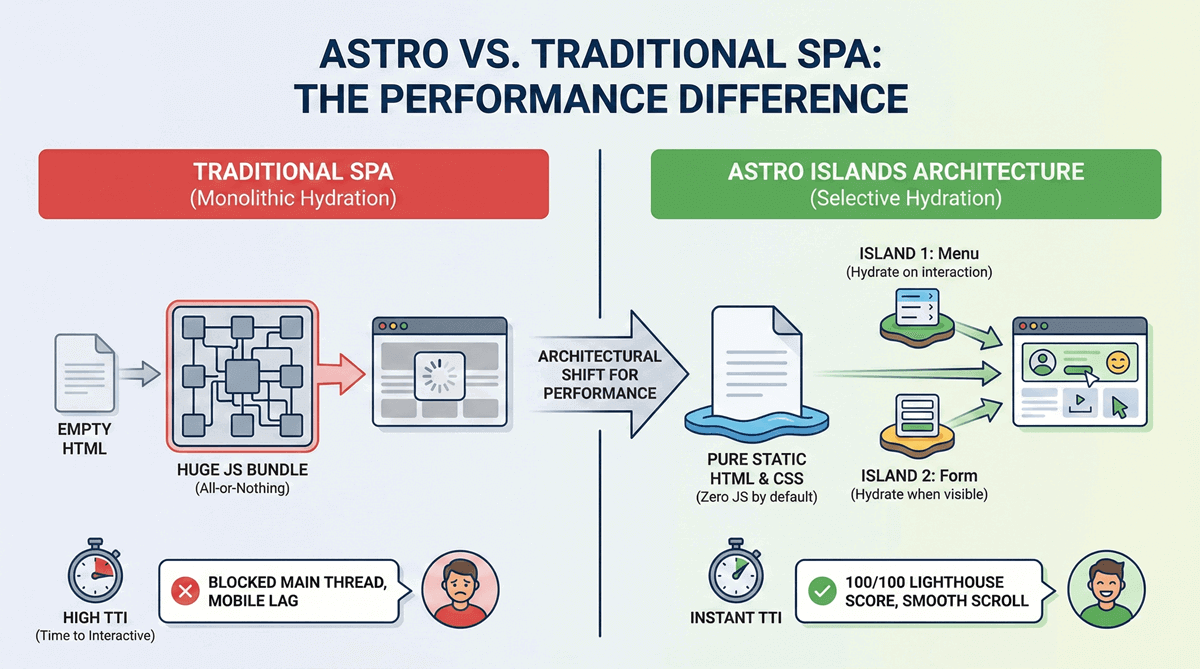
In a typical React (or Next.js) application, the browser downloads an almost empty HTML file and then a huge JavaScript bundle that must be parsed and executed to “draw” the page. This process is called hydration. The problem?
- High TTI (Time to Interactive): The user sees the page but can’t click anything until the JS finishes loading.
- Mobile CPU Stress: On budget smartphones, executing all that JS freezes the browser, creating scroll lag.
The Solution: Islands Architecture 🏝️
Astro flips the paradigm (MPA - Multi Page App). By default, it ships 0kb of JavaScript. It is just pure HTML and CSS rendered server-side. But what if I need an interactive component, like a mobile menu or a contact form?
This is where Islands come in. I can tell Astro: “This page is static, but this single component needs to be interactive (hydrated)”.
---
// The rest of the page is pure static HTML
import MobileMenu from '../components/MobileMenu.jsx';
import ThemeToggle from '../components/ThemeToggle.svelte';
---

<MobileMenu client:visible />

<ThemeToggle client:load />
The Results
Thanks to this approach, my portfolio consistently scores 100/100 on Lighthouse. I’m not loading the entire React library to display static “About Me” text. I’m loading React (or Preact, or Svelte) only for that small piece of UI that needs it.
This is the efficiency I strive to bring to every client project: using technology to solve performance problems, not to create new ones.