Surviving i18n: How to Handle a Multilingual Site in Astro
Anyone who has ever had to turn a single-language website into a multilingual one knows this: handling i18n (internationalization) is often a nightmare. Between heavy libraries to install, infinite React contexts, and SEO issues, it’s easy to get lost.
When I designed this portfolio, I knew I wanted it natively bilingual (Italian and English) to reach international clients. Here is how I solved the problem in Astro cleanly, without weighing down the site with a single KB of JavaScript.
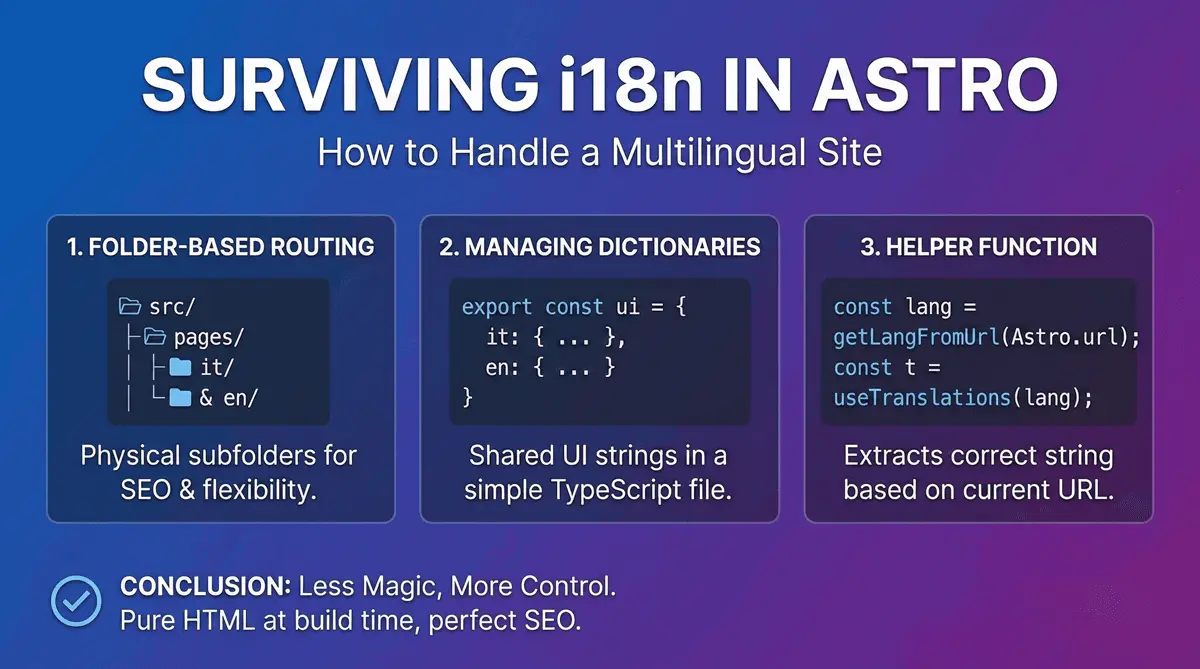
1. Folder-Based Routing
Astro uses file-based routing logic. To separate languages, I opted for the physical subfolder approach (Sub-directory routing), which is also Google’s preferred method for SEO.
My project structure looks like this:
src/
├── pages/
│   ├── index.astro     // Automatically redirects to /it/ or /en/
│   ├── it/
│   │   ├── index.astro
│   │   └── blog/
│   └── en/
│       ├── index.astro
│       └── blog/
This gives me maximum flexibility: I can have pages in Italian that don’t exist in English and vice versa, without going crazy with complex configurations.
2. Managing Dictionaries (UI Strings)
For the UI parts shared between the two versions (like the navbar, footer, or “Read more” buttons), I didn’t want to duplicate code. I created a simple TypeScript file that acts as a dictionary:
// src/i18n/ui.ts
export const languages = {
  it: 'Italiano',
  en: 'English',
};

export const defaultLang = 'it';

export const ui = {
  it: {
    'nav.home': 'Home',
    'nav.about': 'Chi Sono',
    'nav.portfolio': 'Progetti',
  },
  en: {
    'nav.home': 'Home',
    'nav.about': 'About Me',
    'nav.portfolio': 'Projects',
  },
} as const;
3. The Helper Function for Translations
To extract the correct string based on the URL the user is currently on, I wrote a small utility function. Astro allows me to read the current URL server-side and figure out which language we are in:
---
// Inside an Astro component (e.g., Navbar.astro)
import { getLangFromUrl, useTranslations } from '../i18n/utils';

const lang = getLangFromUrl(Astro.url);
const t = useTranslations(lang);
---

<ul>
  <li><a href={`/${lang}/`}>{t('nav.home')}</a></li>
  <li><a href={`/${lang}/about`}>{t('nav.about')}</a></li>
</ul>
Conclusion: Less Magic, More Control
The real strength of this approach in Astro is the lack of “black magic”. There is no global state provider slowing down the client, no external libraries to maintain. Everything is resolved at build time. The final result is pure HTML sent to the browser, perfectly translated, and with the <html lang="en"> and hreflang tags flawlessly configured for SEO. If you’re interested in another technical Astro case study, I’ve also documented how I implemented JSON-LD structured data for technical SEO on this same site.
Frequently Asked Questions
What is i18n in web development?
i18n (internationalization) is the technical framework that allows a website to be translated into multiple languages without duplicating core application logic.
Why is sub-directory routing best for international SEO?
Google favors sub-directories (like /it/ and /en/) for multilingual SEO. It clearly targets different geographic markets, helping Italian companies reach a global audience.
How does Astro optimize multilingual performance?
Astro generates translated HTML at build time, eliminating the need for heavy client-side JavaScript state management, which guarantees blazing fast load times.


Have a similar project in mind?
If this article gave you useful ideas, I can help you put them into practice on your site or project.
Get a Free Quote