When it comes to tracking the success of a website, the first name that comes to everyone’s mind is Google Analytics. Analytics is fantastic: it tells you what users do after they enter your site.
But there is an even more important question that Analytics cannot answer: what happens before? How do people search for you on Google? How many times does your site appear in searches but gets ignored in favor of a competitor?
The Google Search Console (GSC) answers these questions. It is the most powerful free tool provided by Google, but it is often ignored by business owners and freelancers because the interface looks like an engineer’s dashboard. In reality, you only need to know 4 metrics and apply a simple weekly routine to achieve extraordinary results.
The 4 Fundamental Metrics (Your Basic Vocabulary)
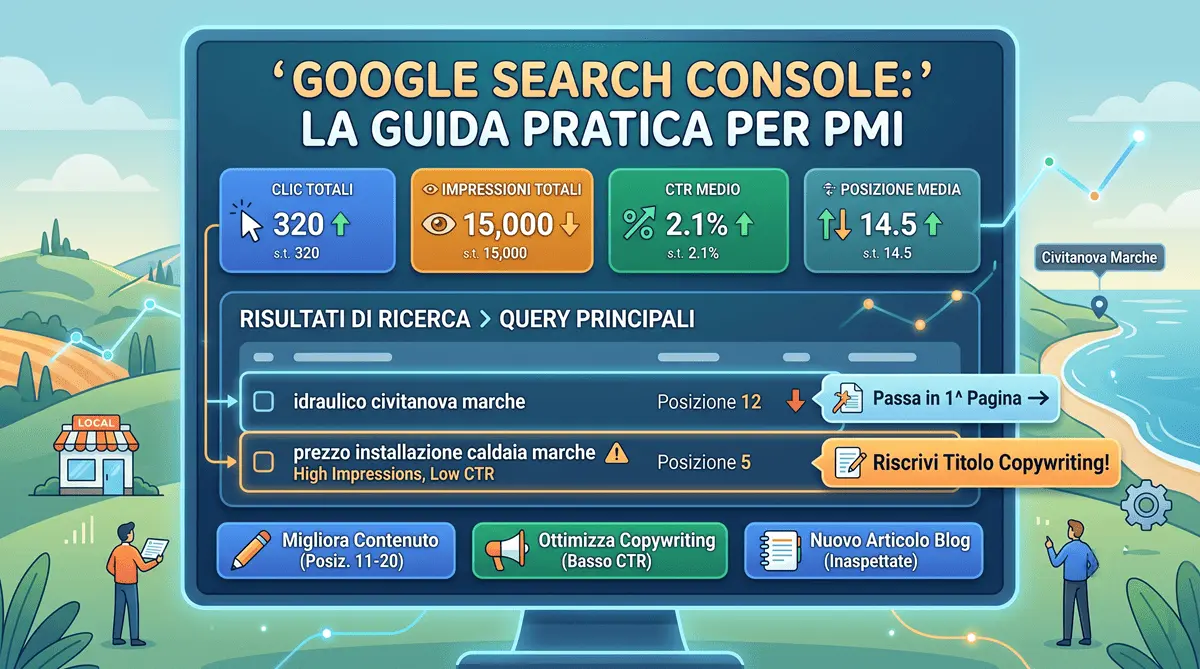
When you open the “Performance” section of the Search Console, you face a chart with four numbers. Here is what they mean in plain English:
- Total Clicks: How many times a person actually clicked on your link in Google results, landing on your site.
- Total Impressions: How many times your site appeared on the screen of a user doing a search (even if they didn’t click). This is your potential visibility.
- Average CTR (Click-Through Rate): This is the percentage of people who clicked versus those who saw you. If you have 100 impressions and 5 clicks, your CTR is 5%. The higher it is, the more attractive your title is.
- Average Position: Where you rank on Google. Remember that the first page holds about 10 results. An average position of 12 means you are at the top of the second page.
The Weekly Routine (What to Look At)
You don’t have to spend hours analyzing every single chart. You just need to dedicate 15 minutes a week to this specific section:
Go to Performance > Search Results and scroll down to the table. Click on the “Queries” tab (queries are the exact words or phrases people typed into Google). Here you will find the list of keywords your site is ranking for.
3 Concrete Actions to Improve Your Business
Having data is useless if you don’t take action. Here are three immediate strategies you can apply by analyzing the “Queries” table:
1. “Second Page” Syndrome (Positions 11-20)
Look in the table for queries where you have an average position between 11 and 20. This means Google considers you relevant, but has relegated you to the second page (where no one goes looking). The Action: Go to the page on your site that corresponds to that search and improve it. Add a paragraph, insert Frequently Asked Questions (FAQs), expand the content. Often, a small update is enough to make the jump to the first page and double the traffic.
2. High Potential, Low CTR (Many Impressions, Few Clicks)
Sort the table by “Impressions”. If you find a query with thousands of impressions, a good position (e.g., on the first page) but very few clicks (CTR under 2%), you have a “storefront” problem. The Action: Your Title and Meta Description are boring or do not respond to the user’s search intent. You need to rewrite them using Copywriting and UX Writing principles to make them irresistible and “steal” clicks from your competitors.
3. “Unexpected” Queries (Ideas for new content)
Scrolling through the queries, you might find search terms you hadn’t thought of or specific questions your site only answers in passing. The Action: Use them as your editorial plan! If you see that many people arrive at your site searching for “How much does a plumber cost in Civitanova Marche”, immediately write a whole blog post (or create a dedicated page) on exactly that topic.
Conclusion
Google Search Console is not a tool just for tech experts. It is the direct communication channel between Google and your business. Learning to read its essential metrics allows you to stop operating “in the dark” with your digital marketing, enabling you to make decisions based on real data and the actual needs of your future customers.
To complete the technical picture, take a look at my guide on JSON-LD structured data, another key piece for helping Google understand your site better. If you want a broader view of the digital transformation journey for local businesses, I’ve also written about digital transformation for Italian SMEs.
Frequently Asked Questions
What is the difference between Google Search Console and Google Analytics?
Analytics tracks user behavior after they visit your site. Google Search Console shows what happens before: exactly which search queries, impressions, and rankings drive users to your digital business.
How can I improve my website's CTR (Click-Through Rate)?
If a page has high impressions but a low CTR, you must optimize its Meta Title and Description using UX writing principles to make it stand out and steal clicks from your competitors.
Do you provide SEO consulting and Search Console analysis in Italy?
Yes, from my studio in Civitanova Marche I build high-performance websites and analyze Search Console data to steadily improve local and national visibility for Italian SMEs, including those also targeting international markets.

Have a similar project in mind?
If this article gave you useful ideas, I can help you put them into practice on your site or project.
Get a Free Quote