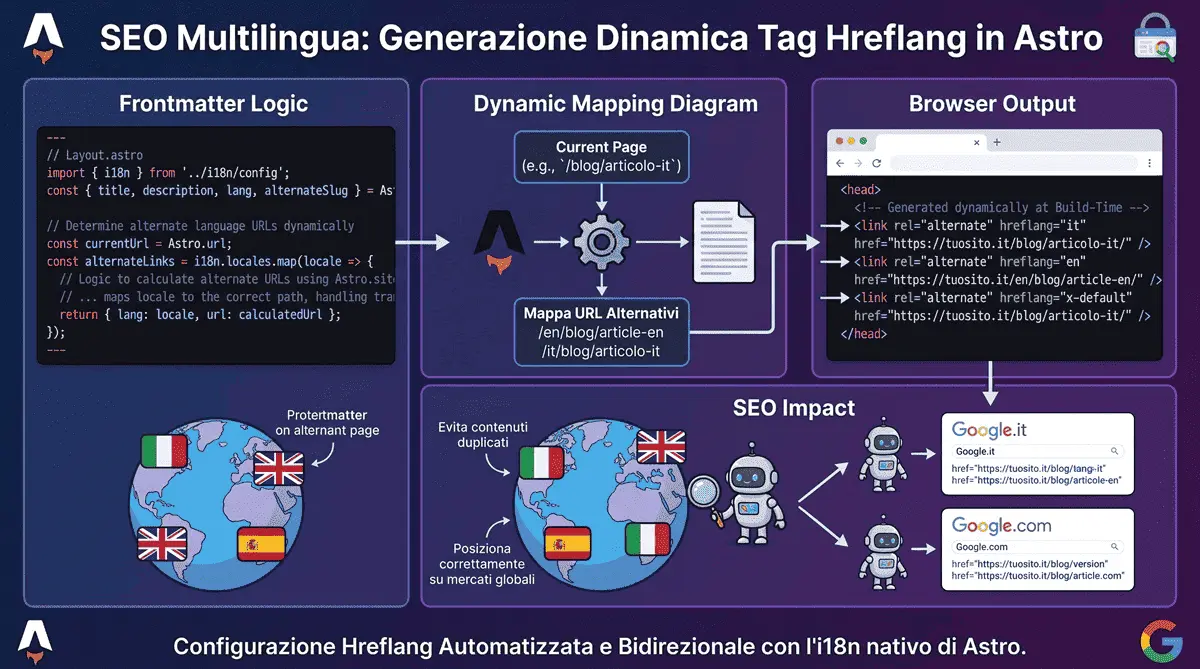
hreflang and Multilingual SEO: How to Avoid the Most Common Mistakes
When translating a website into multiple languages, the expectation is to instantly double organic traffic. The reality, very often, is a collapse in rankings due to Google’s algorithm getting confused, ultimately labeling the new pages as “duplicate content” or serving the wrong language to the wrong user.
The culprit behind this disaster is almost always a misconfigured or missing hreflang attribute. This small snippet of HTML code communicates the exact language architecture of your site to Google, telling it: “This page is for people searching in Italian, while this other one is for people searching in English” - the same clean-architecture principle behind my guide to XML sitemaps and robots.txt.
The Anatomy of the Perfect hreflang
To help search engines understand the relationship between the linguistic variants of a page, we must insert <link> tags into the <head> section of the HTML document.
On this very site, for instance (which uses no /en/ prefix for the default language, only for English), the code injected into both pages of this article is this:
<link rel="alternate" hreflang="it" href="https://www.leonardocastignani.it/blog/hreflang-seo-tecnica-siti-multilingua-astro-marche/" />
<link rel="alternate" hreflang="en" href="https://www.leonardocastignani.it/en/blog/hreflang-technical-seo-multilingual-websites-astro-italy/" />
<link rel="alternate" hreflang="x-default" href="https://www.leonardocastignani.it/blog/hreflang-seo-tecnica-siti-multilingua-astro-marche/" />
The 3 Fatal Mistakes to Avoid
Analyzing my clients’ sites, I regularly find three implementation errors that invalidate the entire setup:
- Missing self-referencing tag: Google’s golden rule is that every page must link to itself. The Italian page must not only link to the English version, but it must also have an
hreflang="it"tag pointing to its own URL. - Non-bidirectional links: If Page A (Italian) declares that its translation is Page B (English), Page B must return the favor by pointing back to Page A. If this return link is missing, Google will ignore the attribute to prevent external manipulation.
x-defaultchosen without a rationale: Many generic guides recommend always pointingx-defaultat the English version “because it’s the universal language.” That’s not a fixed rule - it should point to your site’s actual default locale. On this very site, for instance, it points to the Italian version, because Italian is thedefaultLocaleconfigured in Astro’s i18n, and the primary audience is domestic - not a blind default copied from a tutorial.
The Real Solution in Astro (Not Just Theory)
In traditional CMSs, managing these tags - especially when slugs (URLs) change from language to language, as they almost always do on a blog, where the translated title changes the slug - is a nightmare that requires heavy plugins. On this site, the logic lives in exactly one place, the shared layout used by every page, with nothing duplicated elsewhere.
Every blog post declares an alternateSlug field in its own frontmatter, pointing to its translation’s slug:
# This very article's frontmatter
lang: "en"
alternateSlug: "hreflang-seo-tecnica-siti-multilingua-astro-marche"
The shared layout reads this value and, when present, uses it to build the exact URL of the translated page; otherwise it falls back to a generic /en prefix swap, which works fine for pages that share the same slug in both languages (like the homepage or tag pages):
---
// Layout.astro (simplified)
const itPath = currentLang === 'en' ? (currentPath.replace(/^\/en/, '') || '/') : currentPath;
const enPath = currentLang === 'it' ? (`/en${currentPath === '/' ? '/' : currentPath}`) : currentPath;

// alternateIt/alternateEn come from the page itself (computed from alternateSlug when present)
const hreflangIt = alternateIt || new URL(itPath, Astro.site);
const hreflangEn = alternateEn || new URL(enPath, Astro.site);
---

<link rel="alternate" hreflang="it" href={hreflangIt} />
<link rel="alternate" hreflang="en" href={hreflangEn} />
<link rel="alternate" hreflang="x-default" href={hreflangIt} />
This same alternateSlug value isn’t only used for hreflang: it’s also what I recently used to fix a real bug in the site’s header language switcher. Before the fix, clicking “EN” from a blog post landed on the generic article list instead of that post’s actual translation - because that component recalculated the link on its own, ignoring the value that was already available and correct. A practical reminder: if you compute the same piece of data in two different places in your codebase, sooner or later those two places drift apart.
Investing time in accurately mapping hreflang tags is not a technical vanity project; it is a strategic move for brand protection. It prevents cannibalization among your own pages, ensures that international customers land on the version tailored for them - a piece that ties directly into local SEO strategy and what I already covered in my guide to multilingual i18n websites in Astro - and signals to search engines that yours is not an amateur site, but a digital ecosystem designed to scale across global markets.
Frequently Asked Questions
What is the hreflang tag and why is it important for SEO?
The hreflang tag is an HTML attribute that tells search engines the specific language and geographical targeting of a webpage. It is vital for multilingual sites because it prevents Google from treating translated pages as duplicate content and ensures users receive the correct language version.
Why must hreflang tags be bidirectional?
Google mandates bidirectionality to prevent external manipulation. If an English page points to its Italian translation, the Italian page must contain a return tag pointing back to the English one. If the return link is missing, Google will invalidate the tags on both pages.
Do you build SEO-optimized multilingual websites for global clients?
Absolutely. Operating from Italy, I engineer high-performance Astro websites with fully integrated i18n architectures. I ensure flawless technical SEO - from hreflang generation to complex routing - helping international brands scale effortlessly.



Have a similar project in mind?
If this article gave you useful ideas, I can help you put them into practice on your site or project.
Get a Free Quote