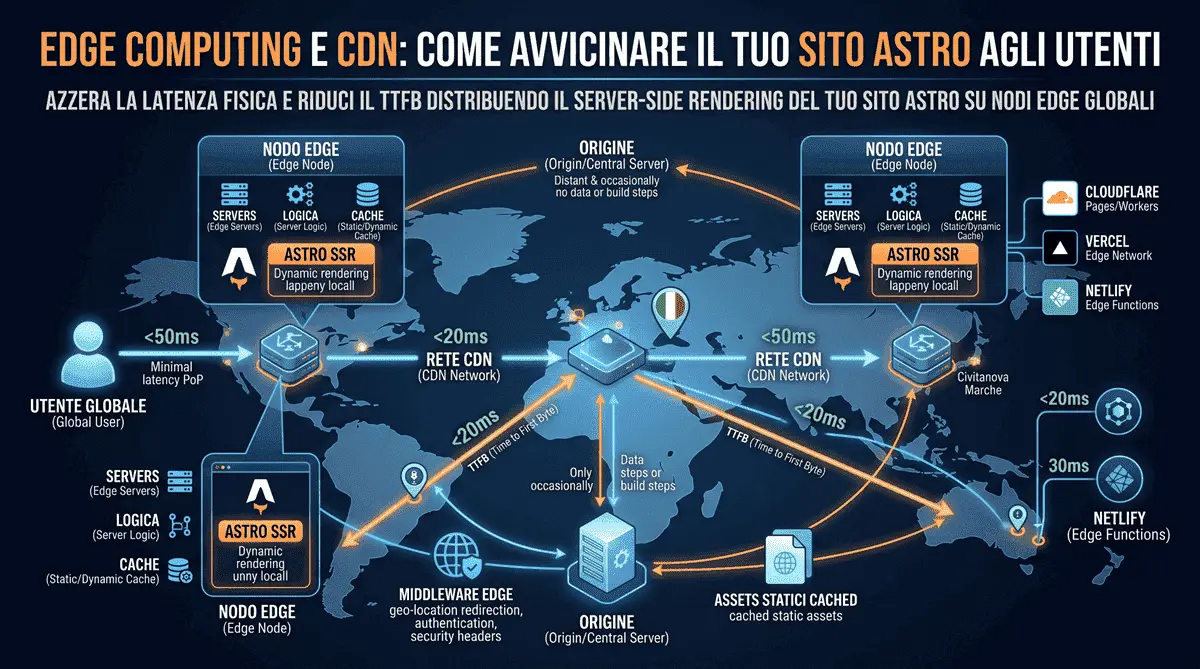
Edge Computing and CDNs: How to Bring Your Astro Site Closer to Users
Until a few years ago, the concept of “hosting” for a website was very straightforward: you rented space on a server located in a specific city (for example, Milan or Frankfurt) and uploaded your site’s files there.
This approach has a massive physical flaw: distance. If your server is in Milan and a user connects from New York, the data must physically cross the Atlantic Ocean. This journey takes time, generating what we call latency. In the modern web, where attention is measured in milliseconds, such a delay costs conversions and SEO rankings - the same principle I cover in my article on how site speed impacts sales and rankings.
The solution to this physical limit is called Edge Computing. Let’s see what it is, how it drastically lowers the TTFB metric, and how I natively integrate it into projects built with Astro.
What is a CDN and Edge Computing?
Let’s start with the basics. A CDN (Content Delivery Network) is a global network of servers. When you use a CDN, your site no longer resides on a single computer; it is copied (cached) across hundreds of servers around the world, known as Points of Presence (PoPs). If a user from New York visits your site, the files are sent from the New York server, not the Milan one.
Edge Computing is the evolution of this concept. It is not limited to distributing static files (like images and HTML), but allows you to execute code and server logic directly on these “peripheral nodes” (the Edge): authentication, content personalization, geolocation, A/B testing - all computed milliseconds from the user instead of on a single centralized origin.
The Real Enemy: TTFB (Time to First Byte)
TTFB is the metric that measures the time between the moment the user clicks a link and the moment their browser receives the very first byte of data from the server.
If your site has a slow TTFB (over 600 milliseconds), no image optimization or code minification can save you: the page will simply appear stuck before it even starts loading. TTFB is also the time baseline that Largest Contentful Paint (LCP) is built on - the heaviest Core Web Vitals metric in Google’s ranking judgment, as I explain in my 2026 Core Web Vitals guide. Deploying the site to the Edge eliminates physical distances, ensuring a global TTFB of less than 50 milliseconds.
Astro and the Edge: A Perfect Match
Astro was born with a natural inclination for speed. When you generate a Static Site (SSG), the pure HTML files are perfectly suited for distribution on a traditional CDN, as I described in my article on Astro’s Islands Architecture.
But the real leap in quality happens when you need dynamic features (like an e-commerce cart updated in real-time, a login system, or internal search) using Server-Side Rendering (SSR).
Instead of running a traditional Node.js server in a single data center, Astro natively supports Adapters to execute rendering directly on the Edge. This means the dynamic page is created on the node physically closest to the user, not on a server thousands of kilometers away.
The three best providers (and the ones I use often) for hosting an Astro project on the Edge are:
- Cloudflare Pages & Workers: one of the largest Edge networks in the world, running on V8 Isolates (near-instant startup, no “heavy” cold starts). Great for global scalability and built-in anti-DDoS protection.
- Vercel: built for Next.js, but offers excellent, zero-config support for Astro thanks to its Edge Network and tight integration with Git-based deploys.
- Netlify: a pioneer of the Jamstack architecture, with Edge Functions built on the Deno runtime, extremely easy to integrate and well documented for Astro projects.
A Practical Example: The Cloudflare Adapter
To transform a local Astro site into an application distributed across Cloudflare’s global network, you just need a simple terminal command to install the adapter:
npx astro add cloudflareAnd Astro will automatically configure your astro.config.mjs file:
import { defineConfig } from 'astro/config';
import cloudflare from '@astrojs/cloudflare';

export default defineConfig({
  output: 'server',
  adapter: cloudflare({
    mode: "directory"
  }),
});
With just three lines of configuration, your code is ready to run on hundreds of data centers worldwide simultaneously.
Mind the Edge Runtime Limits
There’s one detail that trips up many developers on their first migration: the Edge runtime is not Node.js. It runs on lightweight environments (V8 Isolates or Deno Deploy) that lack access to some traditional APIs, like the filesystem (fs) or certain native Node modules. If your project relies on libraries that need fs at runtime, or npm packages built exclusively for Node, that code needs to move into a build step - or the project needs to ship with a classic Node adapter instead of the Edge one.
Another thing worth checking is how you handle security headers: if you’re already using an Astro Middleware to inject a Content Security Policy, as described in my guide to CSP on Astro, that Middleware runs just as well on the Edge - that’s actually where it performs best, since it enforces your security rules as close as possible to the user, before the request even reaches your origin.
Edge Middleware: Personalization Without Sacrificing TTFB
One of the most interesting Edge use cases isn’t just “serving a static asset faster” - it’s deciding what to serve based on the context of the request, without paying the cost of a round trip to a distant origin. An Astro Middleware running on the Edge can, for example, read the Accept-Language header or the request’s IP geolocation to automatically redirect a user to the correct language:
import { defineMiddleware } from "astro:middleware";

export const onRequest = defineMiddleware(async (context, next) => {
  const country = context.request.headers.get("cf-ipcountry"); // Cloudflare geo header
  const { pathname } = context.url;

  if (country === "IT" && !pathname.startsWith("/it") && !pathname.startsWith("/en")) {
    return context.redirect(`/it${pathname}`, 302);
  }

  return next();
});
If this kind of logic ran on a centralized server far from the user, it would add hundreds of milliseconds before the page even started loading. Run on the Edge, the cost is nearly imperceptible - the same “do less work, closer to the user” philosophy behind client-side advanced lazy loading.
Conclusion
Relying on traditional shared hosting for $50 a year for an ambitious digital business is like buying a Ferrari and putting bicycle tires on it.
Leveraging Edge Computing means offering an instantaneous experience to every customer who genuinely needs dynamic functionality, regardless of their geographical location. It isn’t, however, a mandatory choice for every project: if a site - like this very portfolio - doesn’t require SSR, a static build served from a CDN remains the simplest, fastest, and most cost-effective solution. The right criterion isn’t “Edge always and everywhere,” but choosing the architecture that actually fits the project’s needs. If you’re considering a move to a faster architecture, the first step is often rethinking how your site’s rendering is structured - a path I walked myself when migrating a project from React to Astro.
Frequently Asked Questions
What is the difference between a traditional CDN and Edge Computing?
A traditional CDN simply distributes and caches static files like HTML, CSS, and images across servers around the world. Edge Computing evolves this concept by allowing you to execute server logic and dynamic code - authentication, personalization, A/B testing - directly on those peripheral nodes, physically closer to the user, without querying a single centralized origin.
What are the benefits of using Astro with Cloudflare, Vercel, or Netlify?
Astro natively supports Edge adapters for Server-Side Rendering (SSR) on all three providers. By deploying on Cloudflare Workers, the Vercel Edge Network, or Netlify Edge Functions, your dynamic pages are generated on the server closest to the visitor, driving global TTFB below 50 milliseconds with no server to manage manually.
Do you build Edge-powered Astro websites for international clients?
Yes, whenever a project genuinely needs it. This very site, for instance, is statically generated (SSG) and served from a CDN - the fastest and most cost-effective choice for a portfolio with no dynamic logic. But for clients who need real-time functionality - e-commerce carts, gated areas, custom dashboards - I engineer SSR architectures on the Edge with Astro from my studio in Civitanova Marche, Italy, delivering scalable infrastructure and minimal TTFB for both local businesses and global brands.



Have a similar project in mind?
If this article gave you useful ideas, I can help you put them into practice on your site or project.
Get a Free Quote