HTTPS, Security Headers, and Best Practices: Security Explained for Non-Techies
In a previous article, we explored the Content Security Policy (CSP), a literal “safe” against cyber attacks. However, before installing a safe, you need to make sure your shop’s front door has at least a working lock.
In the web world, the foundations of security are often invisible to the eyes of a non-technical person, but their absence can devastate a company’s reputation. Let’s look at the minimum, non-negotiable configurations I demand for every web project I build, explained simply.
1. The Bare Minimum: HTTPS (The Green Padlock)
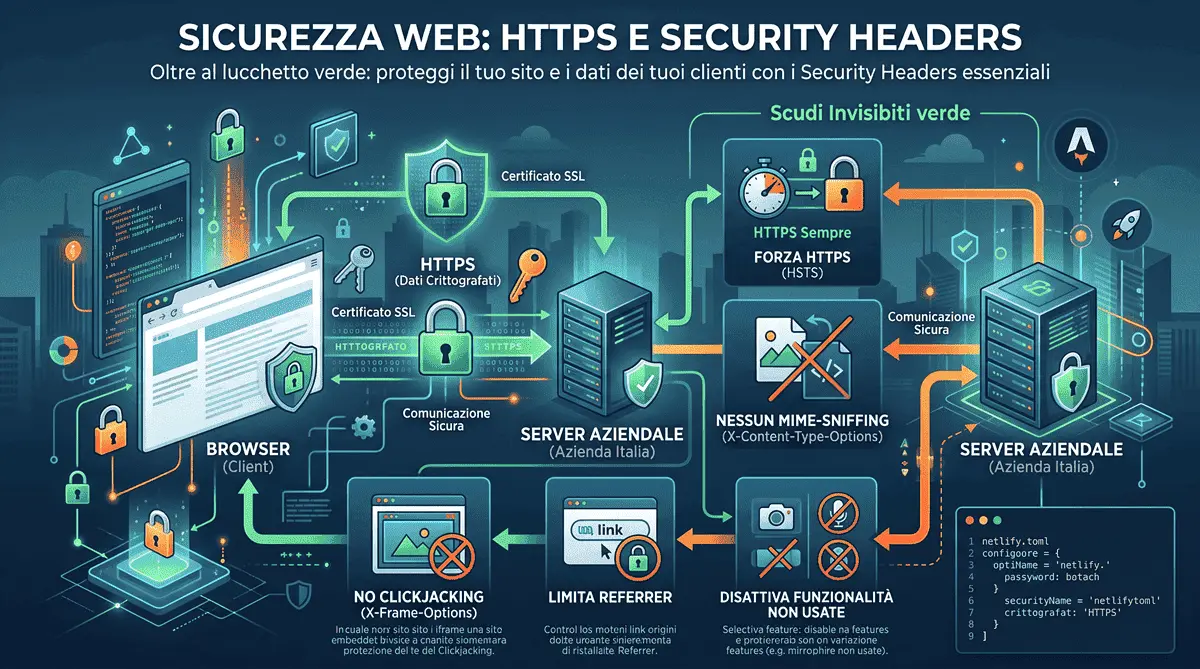
When you browse an http:// site (without the final “s”), the data exchanged between you and the server travels in plain text. It is like sending a postcard: anyone, from the postman to your neighbor, can read its content.
HTTPS (thanks to the SSL certificate) puts that postcard into an armored envelope. The data is encrypted, and only the recipient has the key to read it.
Why is this fundamental for business?
- Trust: Modern browsers (like Chrome or Safari) mark HTTP sites with a glaring red “Not Secure” warning. No customer will enter their credit card or email on a site labeled like that.
- SEO: Google considers HTTPS an official ranking factor. All content being equal, a secure site will always outrank an insecure site in search results - the same technical trust signal behind my 2026 Core Web Vitals guide.
2. Security Headers: The “Invisible Shields”
Having HTTPS today is the baseline, but it is no longer enough. Servers can send hidden security instructions to the visitor’s browser called Security Headers. Think of these headers as an instruction manual telling the user’s browser how to behave to stay out of trouble.
Here are the 3 most important “shields” to know to get started:
HSTS (Strict-Transport-Security)
Even if you have HTTPS, a user might accidentally type your address with http://. A hacker could exploit that fraction of a second to intercept the connection.
The HSTS header tells the browser: “From now on, for the next year, remember to connect to this site ALWAYS AND ONLY via HTTPS, even if the user types the old address”.
X-Frame-Options (Clickjacking Protection)
Imagine a scam site creates a web page and loads your site invisibly inside it, placing their own fake button exactly over your “Buy” button. The user thinks they are clicking on your site, but they are actually giving money to a scammer. This is Clickjacking. This header stops the scam at the root, telling the browser: “Do not allow any other website to embed my pages within an iframe”.
X-Content-Type-Options (No MIME-Sniffing)
Sometimes browsers try to guess what kind of file they are downloading (e.g., an image vs. a script). Hackers use this weakness to disguise a virus as a harmless image and trick the browser into executing it. This header disables the guesswork: “Trust only what the server declares. If the server says it’s an image, treat it as one and don’t try to run it as code”.
The Real Configuration, Not Just Theory
Beyond the 3 core shields, in practice I always configure at least two more: Referrer-Policy (limits how much information about the originating URL is shared when a user clicks a link to another site) and Permissions-Policy (selectively disables browser features - camera, microphone, geolocation - that the site doesn’t use). This is, verbatim, the header block running in production on this very site, declared once at the hosting level (in netlify.toml, since this is a fully static site):
[[headers]]
  for = "/*"
  [headers.values]
    X-Content-Type-Options = "nosniff"
    X-Frame-Options = "DENY"
    Referrer-Policy = "strict-origin-when-cross-origin"
    Permissions-Policy = "camera=(), microphone=(), geolocation=()"
    Strict-Transport-Security = "max-age=31536000; includeSubDomains"
The sixth production header, Content-Security-Policy-Report-Only, I’ve left out of this block purely for readability: I cover it in depth (including the logic of running “Report-Only” mode before switching to real enforcement) in my guide to CSP on Astro.
3. Architectural Security: Why I Use Astro
Beyond servers and protocols, there is an architectural issue. Classic WordPress sites are targeted every day because they rely on databases and plugins that must be constantly updated. A single outdated plugin can bring down the entire site - a trade-off I break down in detail in my comparison of custom-coded sites versus WordPress.
By building sites in Astro (especially in static mode, like this very site), we eliminate much of this attack surface. There is no directly exposed database and no vulnerable admin panels to hack. The infrastructure is inherently more bulletproof.
Conclusion
Web security is not a checkbox you tick once and forget about; it is an ongoing process that continues well beyond launch day - I cover this in detail in my guide to post-launch maintenance. Companies often focus only on catchy graphics, forgetting that a single security incident (Data Breach) can destroy years of hard-built reputation - and trigger real consequences on the compliance side too, as I explain in my 2026 privacy compliance guide. Make sure your developer doesn’t just build you a “pretty site,” but delivers a true digital fortress.
Frequently Asked Questions
Why is HTTPS alone insufficient for complete website security?
While HTTPS encrypts data in transit, it does not protect the site against structural vulnerabilities like Clickjacking or MIME-sniffing. Complete protection requires configuring specific server instructions called Security Headers, which operate at a different, complementary layer.
What are Security Headers and which ones are essential?
Security Headers are invisible directives sent from the server to the browser to prevent exploits. Essential ones include HSTS (forcing secure connections), X-Frame-Options (preventing Clickjacking), X-Content-Type-Options (blocking MIME-sniffing), Referrer-Policy, and Permissions-Policy.
Do you build secure, modern websites for international clients?
Absolutely. Operating from Italy, I build custom web architectures using Astro. By eliminating exposed databases and vulnerable plugins, and strictly enforcing HTTPS and Security Headers, I deliver highly secure platforms for international businesses.


Have a similar project in mind?
If this article gave you useful ideas, I can help you put them into practice on your site or project.
Get a Free Quote