Advanced Lazy Loading: Images, Components, and Modules in Astro
When we talk about web performance optimization, the first rule we learn is: “Don’t load what the user isn’t looking at.”
For images, the web has given us a very easy solution: just add loading="lazy" to the <img> tag and the browser does the rest.
But what happens when the page is weighed down not by an image, but by an interactive component, a massive JavaScript library, or a complex animation located in the footer? The simple HTML attribute is no longer enough.
In this article, we will see how Astro and modern browser APIs allow us to implement advanced Lazy Loading for images, components, and modules, keeping our JavaScript bundle light and our Core Web Vitals metrics flawless - a companion piece to what I already covered in my article on Core Web Vitals in 2026.
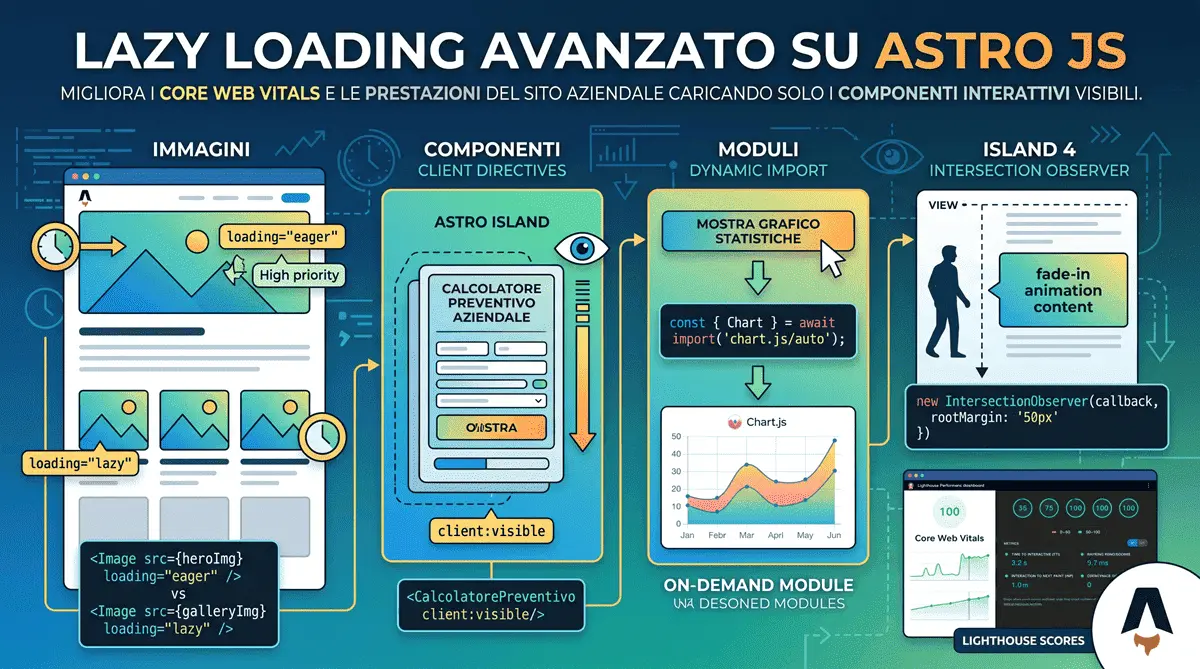
0. Images: loading="lazy" Isn’t Enough (and Can Even Hurt)
Let’s start with the basics, because two common mistakes hide here. The first: applying loading="lazy" to every image indiscriminately, including the Hero image at the top of the page. That image is almost always your Largest Contentful Paint (LCP) - delaying it with lazy actively hurts the very metric you’re trying to improve. For the primary above-the-fold image, use loading="eager" (or omit the attribute entirely) together with fetchpriority="high", telling the browser “download this one now, it’s the priority”.
The second mistake is ignoring Astro’s <Image /> component (astro:assets), which does most of the heavy lifting for you: it automatically generates modern formats (WebP/AVIF), computes width/height to prevent Cumulative Layout Shift, and applies loading="lazy" and decoding="async" by default to every image except the one marked as a priority.
---
import { Image } from 'astro:assets';
import heroImg from '../assets/hero.jpg';
---

<!-- LCP image: no lazy loading, maximum priority -->
<Image src={heroImg} alt="Hero" loading="eager" fetchpriority="high" />

<!-- Image further down the page: lazy is correct here -->
<Image src={heroImg} alt="Gallery" loading="lazy" />
1. Astro’s “Superpower”: Client Directives
The biggest advantage of Astro’s Islands Architecture is total control over component hydration. If you have a heavy interactive component (e.g., a review carousel or a quote calculator) located halfway down the page, there is no point in executing its JavaScript on initial load.
Astro offers several Client Directives to control this process. The most useful ones are:
client:load: Hydrates the component immediately, as soon as the page finishes loading. Reserve this only for genuinely critical above-the-fold components (e.g., an interactive navigation menu).client:idle: Tells Astro to load and hydrate the component only when the browser’s Main Thread is free. Perfect for elements visible immediately, but not critical.client:visible: The real magic. Astro uses the Intersection Observer behind the scenes to load the component’s JavaScript only when it enters the user’s viewport.client:media={query}: Hydrates the component only if a CSS media query matches - extremely useful for a component that’s only needed on mobile (e.g., a hamburger menu), which on desktop has no reason to download even a single byte of JavaScript.
---
// Importing a heavy React/Svelte/Vue component
import QuoteCalculator from '../components/QuoteCalculator.jsx';
---

<!-- The JS code will be downloaded and executed only when the user scrolls down here -->
<div class="mt-96">
  <QuoteCalculator client:visible/>
</div>
2. Dynamic Import (On-Demand Modules)
Sometimes you don’t have a whole component to delay, but a massive JavaScript library. Think of charting libraries (Chart.js), complex form validation, or cryptography.
Instead of importing them at the top of the file (which would include them in the initial bundle), you can use the import() statement to load them dynamically only when a specific event occurs, such as a button click.
<button id="btn-chart">Show Statistics</button>
<div id="chart-container"></div>

<script>
  const btn = document.getElementById('btn-chart');

  btn.addEventListener('click', async () => {
    // Change button state
    btn.textContent = 'Loading...';

    // Dynamic Import: the browser downloads the library ONLY NOW
    const { default: Chart } = await import('chart.js/auto');

    // Initialize the chart
    const ctx = document.createElement('canvas');
    document.getElementById('chart-container').appendChild(ctx);
    new Chart(ctx, { /* config */ });

    btn.style.display = 'none';
  });
</script>
This approach saves hundreds of Kilobytes on initial load, drastically improving the INP (Interaction to Next Paint) metric - the same “load only what’s needed, only when it’s needed” logic I applied firsthand when I documented migrating a project from React to Astro: the problem is often not the framework itself, but the hundreds of KB of JavaScript shipped to the browser without genuine need.
3. Intersection Observer for Custom Logic
If you are working with pure HTML in Astro and aren’t using external UI frameworks, you might need to trigger CSS animations, load videos, or load background images only on scroll. For this, the native IntersectionObserver API is the ultimate tool.
Here is an example of how to trigger an animation class only when an element appears on screen, optimized to run in Astro’s <script> tags:
<div class="fade-in-element opacity-0 transition-opacity duration-1000">
  Content that smoothly fades in...
</div>

<script>
  // Function to handle intersections
  const setupObserver = () => {
    const observer = new IntersectionObserver((entries) => {
      entries.forEach(entry => {
        if (entry.isIntersecting) {
          // When the element is visible, remove zero opacity
          entry.target.classList.remove('opacity-0');
          // Stop observing it to save resources
          observer.unobserve(entry.target);
        }
      });
    }, { rootMargin: '50px' }); // Starts 50px before it appears

    // Apply the observer to all target elements
    document.querySelectorAll('.fade-in-element').forEach(el => observer.observe(el));
  };

  // Run on DOM load
  document.addEventListener('DOMContentLoaded', setupObserver);
</script>
Conclusion
Relying solely on loading="lazy" is no longer sufficient to build high-end web experiences. Surgically managing when and how the browser downloads JavaScript and media is what differentiates a slow, clunky site from a snappy application capable of converting users without frustrating them. By leveraging Astro’s directives and Dynamic Imports, you get maximum results with minimal engineering effort. And those saved milliseconds aren’t an academic exercise: as I cover in my article on how website speed impacts sales, every second of load time shaved off translates directly into fewer abandoned visits and more conversions.
Frequently Asked Questions
What is advanced lazy loading and why is it crucial for Core Web Vitals?
Advanced lazy loading defers the execution of heavy JavaScript and UI components until they are actually visible. This drastically improves the Interaction to Next Paint (INP) metric, ensuring a seamless user experience and higher SEO rankings.
How do Astro's client directives improve website performance?
Astro's Islands Architecture uses directives like client:visible to automatically leverage the Intersection Observer. It ships zero JavaScript by default and hydrates interactive components only when they enter the user's viewport.
Do you offer web performance optimization services for international businesses?
Absolutely. Operating from Italy, I engineer high-performance, custom Astro websites for global clients, focusing on strict Core Web Vitals compliance and advanced technical SEO to scale their international digital presence.



Have a similar project in mind?
If this article gave you useful ideas, I can help you put them into practice on your site or project.
Get a Free Quote